Posts

Showing posts with the label iTunes

Why is Apple killing Enhanced Podcasts?

Image
I've been an off + on podcaster for a few years. You can check out my electronic music appreciation podcast = Thank You For The Music (shameless plug). From the start, I wanted to do enhanced podcasts just like the wonderful podcast Coverville . Enhanced podcasts add chapter support with different artwork per track and even URLs to podcasts. A really useful feature IMO. In recent years it seems both iTunes + Apple's Podcast app support for enhanced podcasts have become worse. iOS I've been testing the Podcast App and it doesn't even display the chapter artwork properly. It works well on Downcast App. Desktop In iTunes 12.6 as you can see the controls are hidden, difficult and don't work very well. The chapter artwork also doesn't change except on the mini player view. WEAK!!! Downcast for macOS has better support Enhanced Podcast support vs iTunes 12. It seems third party devs may be following Apple's lead, OvercastFM my current a...

Star Wars Rogue One iTunes Extras

Image
The extras are pretty cool!  -- VBC

iTunes Family Sharing Requires a Credit Card

Image
This is a bummer for someone like me who relies on iTunes credit to buy stuff from Apple.

Day 5: Videos, Missing Icons, Phantom Icons, and Missing eWallets

Image
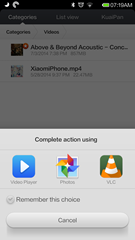
Today the Video Player icon has gone missing. I know the app is still on the device because the video I loaded still played on the default player. I have scoured all the folders and I have no idea where the icon went. Speaking of video, watching videos on this device is fantastic! The drawback of course is I cannot play iTunes purchases but since Google Play Movies are now available in the Philippines, I guess that is a wash. One thing the iPhone can do that this device can’t is Netflix. Now that’s a huge let down. Also this phantom icon has appeared and when I uninstalled it Google Search gets uninstalled too. Weird stuff for sure. Another thing that happened to me... I wanted to check on my yahoo password so I could link my Flickr account to Instagram on the Mi3W. When I opened up eWallet, my password was not being accepted. Upon checking I realized it was the default blank wallet. Both my wallets were gone. I suspect that the Mi3W cleanup I did last night nuked ...

Still Not Down On Streaming.

Image
Spotify App I embraced digital media quickly, yep I was one of those guys who converted all of their music to digital and now I rarely purchase physical media. However I cannot get my head around streaming. I just feel that internet bandwidth and reliability are not there yet. My phone still gets No Service and EDGE for fuck's sake. iTunes Radio (in the Music App) So the quick response of streaming apologists would be to cache the songs (read: keep a local copy) and my response is that isn't that what I am doing now when I purchase a song, download the file, and sync it to my device?  I know I am in the minority tho, digital music sales are on the decline . Downcast (podcast app) For now I think streaming's strength is in music discovery. Still music discovery can be done via social media like twitter or facebook or my preferred way podcasts! 

Mobile Road-map for 2013

In a couple of weeks we would go into 4th Quarter 2012. So it's time to think about your device road-map for 2013.  I have analyzed my use case and I mostly use Google services like GMail, Calendar, YouTube, Maps the only thing I leave on iCloud is Contacts and Notes. So for PIM (personal info management) it would be a minor issue to move over to an Android device. A big plus would be getting Google Maps back since Apple has decided to discard it and YouTube in iOS6. Gmail, Calendar, Maps, YouTube all are free and all are great! Good job Google.  However when I look at applications, games, media (basically entertainment) it is clear that I am trapped in the iTunes ecosystem. I have spent a lot on the AppStore and I do not think it would be possible to make a clean break with it any time soon. Good job Apple.  I have always been pro-convergence. One device preferably pocket-able for communications, work, and play. However the escalating pla...

BOOM! Music and Movies now available for iTunes Philippines

Image
Wow... they weren't kidding ( Apple press release )!!! Music and Movies now available for the Philippines (PHL) iTunes store. I had lost all hope that we would ever get access to iTunes media so earlier this year I switched my account to the US iTunes store. Now you don't need to jump thru hoops like I did and stay with your Philippine account and have access to Music and Movies. TV shows are still absent. Music! Movies on the PHL store Movies on the US store Of course not everything is available but this is a huge step in the right direction.   NB: I have not tried purchasing/renting media with a Philippines iTunes account but do share your experience if you've tried it.

iTunes 10.5.3 and iCloud Control Panel 1.0.1 for Windows is out

Image
I recommend you backup your iCloud contacts using Export feature of Outlook to a pst and/or CSV file before updating.

Tips: Remove Broken Files or Missing Files from iTunes Library

Image
Sometimes when you move things around you get broken or missing files in iTunes. Here is how to get rid of those ghost files. Step 1: Create a SMART PLAYLIST name it  All Files  Use Artist is not 123456789 (so it will pick-up everything) as variable you may also add other filters like is not podcast or is not audiobook or is not video etc Step 2: Create a STATIC PLAYLIST  and name it All Live Files (so the list is empty at first) Step 3: Select everything in All Files (SMART PLAYLIST) and drag and drop onto All Live Files (STATIC PLAYLIST) iTunes will only copy the unbroken files.  Step 4: Create a second SMART PLAYLIST  name this Missing Files  use the following as variables: Playlist is All Files (from Step 1) Playlist is not All Live Files (from Step 2) Step 5: When you click on Missing Files ( SMART PLAYLIST , from step 4) you should be left with only your missing files. Select all (or some) of ...

Apple Removes Convert to AAC/MP3 from iTunes

I have been using this feature to create AAC files (M4A) renaming them to M4R to make Ringtones for the iPhone. With Apple’s newest (still bloated) version of iTunes they have removed this feature. It really pisses me off when companies remove functionality which was there for so long and which was very very useful. Does anyone know of a way to convert MP3s to AAC (preferably for free)? I would like to keep on making ringtones for the iPhone.

Tips & Tricks|Moving iTunes Library to a New PC

Image
The most painless way I have tried so far. There are two (2) parts to your iTunes Files & Library, files are self explanatory and the library will include your playcounts, playlists etc etc. If you sync your iPhone or iPod you need to move your entire library so that you won’t have to make a new partnership. Here’s what you need: iTunes USB HDD Patience Step 1: Copy your files to Ext HDD Plug-in the USB HDD to source PC Start iTunes Edit > Preferences > Advanced (tab) Point it to your USB HDD click ok File > Library > Organize Library… Consolidate Library iTunes will now copy the files over to your HDD Exit iTunes Step 2: Move your Library to Ext HDD Start > Run… type in the library location Copy the files to your Ext HDD Eject your HDD ========================================== Step 3: Move files to new PC Hold Shift key and click on iTunes you will see...