Posts

Showing posts with the label Google

Hello, Goodbye, Hello Moto...

Image
A few weeks ago I purchased a Moto E4 Plus it was a very affordable and capable device but unfortunately, the South East Asia version lacked NFC. Since I will be moving to a place where there would be support for Android Pay I figured I should at least get a device with both Fingerprint and NFC capability. Yesterday I got a Moto Z Play which has NFC. Deleted and packed off the E4 Plus for sale. I got a lot of freebies, a Moto Mod compatible flip case, and a Moto Mod Incipio battery pack. All for 19,999 Php -- a very good deal! The Z Play originally came with Android 6 Marshmallow, but I was able to update it to 7 Nougat and I read that Motorola/Lenovo (oh ya, Lenovo bought Motorola from Google) will be upgrading it to 8 Oreo as well. Hope that pans out!

Google Chrome updated to Material Design

Image
Chrome puffs rejoice!

The Split Personality of the Google Ecosystem

Image
LEFT: Google Now recommending an album.  RIGHT: Google Play not allowing me to purchase.  FYI: The item is available on iTunes. 

Back to the iPhone 5S, the Mi3W as a 2nd Screen

Image
So after a week on (mostly) only Android. I therefore conclude that the OS has come a long way from gingerbread. I think credit is due to both Google and Xiaomi. The MIUI does not get in the way. There isn't a lot of useless stuff included (take a hint Samsung). The Mi3W is great value. It is well spec'd and beautifully made. Kudos to X & G, for a JWD. If I was not heavily invested in the iOS / iTunes ecosystem or I if I were of a mind to seriously switch, it is possible, however it is not totally painless depending on which computer you have (Mac or PC). Android was designed for the cloud. But in my case I do not trust the Philippine ISPs and Telcos. I would still need offline copies of my content and data simply because our internet is NOT reliable enough. As I have said in my previous ramblings streaming may be big in other countries but it is not a reliable option for the Philippines (YMMV). I do love those free services. Google still has the upper hand when it comes t...

Day 2: iPhone to Android: Apps & Issues

Image
Ok. As I mentioned in my previous post I am embarking on a one (1) week Android only experiment. This post will focus on the apps I have purchased to make the switch from iPhone to Android. The experiment will last until Tuesday, June 8, 2014, at that point I will decide if I will stick to the Mi3W as my main device and use the iPhone 5S as a secondary. Right now the iPhone is in a drawer. PODCASTS - I am podcast fanatic, I think they are great and on my iPhone and Mac, I use the amazing [ DOWNCAST APP ]. I have tried about ten podcast apps in my previous flings with the Android platform and all of them have not been a good experience. Well that all changes with [ POCKETCASTS by shiftyjelly ] it is a paid app at 159.41PhP and it’s fast, slick and easy to use. However it does not support enhanced podcasts, I hope this functionality is added in the future. MUSIC – The Mi3W’s player does not display album art, so I am using Google Play Music to play local files. Let us go int...

Google Now: Android vs iPhone

Image
The following clips show the difference in response of Google Now for iPhone vs Android. Also added a Siri clip for comparison. Google Now Android Test Google Now iPhone Test Siri Test What's curious is the information being presented on Android has already been acquired by Google so why is it not showing up on the iPhone side? Keep in mind the iPhone app is behind the Android app.

Samsung (Android) Bug with CX Mobile Boarding Pass

Image
Here is a dumb Samsung (Android) bug.  Device = Samsung Galaxy S3 If you check-in to your Cathay Pacific flight via the CX Mobile App or their site using Samsung browser (or Chrome) you get to send a link of your mobile boarding pass to an email address. When you click this link instead of displaying your mobile boarding pass it tries to load itself to wallet (?). Searching for Google wallet in PlayStore yields nothing my dad has a Philippine account, and it appears Google wallet is not available. So you cannot view or download your boarding pass on a Samsung device??? The link should not be automatic. It should not try to download the boarding pass if the wallet app isn’t even installed. In iOS the mobile boarding pass is shown and the user has the option to add it to passbook or not.  As a workaround I emailed the link from S3 to 5S, I was able to open and view the link on Safari Mobile. I took a screenshot and emailed him the file. For some odd reason ...

Discontinued Google Maps vs Bleeding Edge Apple Maps

Image
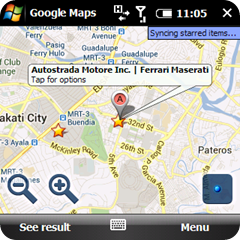
PNDs or Personal Navigation Devices are long gone. Most modern Smartphones now include Map software. The biggest difference between PNDs and these apps are that Map data is now downloaded and not on the device. I am still irritated at both Apple and Google. They can’t seem to get along enough to offer Google Maps built into iOS as in previous versions, so Apple decides to roll their own Maps software. Which in a word: SUCKS! Below is a screen shot of the discontinued Google Maps on the discontinued Windows Mobile 6.1 it still connects to Google Maps and gets the proper data. Lets compare it to Apple Maps on iOS 7 beta 3 The old obsolete version of Google Maps still returns better results than the bleeding edge version of Apple Maps. Apple please get better data for your Maps software so you will be able to compete with Google.

How To Export iCloud Contacts to Google Contacts

Image

Tips & Tricks|Google Sync & You

Image
If you have multiple devices or switch devices frequently take a look at Google Sync. I use this to keep my contacts, calendar, mail synchronized across 4 mobile devices (on 4 different platforms). http://www.google.com/sync/index.html A few things to keep in mind (in order of importance IMO)… USE COMMON FIELDS – different devices and platforms have different fields for example an iPhone will have an iPhone label but Google contacts, Windows Mobile, Android and Nokia will not. This field therefore will be dropped! Suggested fields are: Mobile, Work, Home, Email REQUIRES DATA CONNECTION – your PIM data will be stored online under Contacts of your Google Mail so you will need an internet connection at least for 1st run & when you make changes to your databases and you want to reflect these on other devices. BACKUP – Nothing is 100% full (or fool) proof be sure you have good backups and do regular backups of your devices and your databases. What I do is I export the g...

Google Maps

Image
[Web - Map View] [Web - Satellite View] ---- [WinMob – Map View] [WinMob – Satellite View] ----- It seems Google Maps for NCR at least is being updated with more data streets and POIs which is a good thing, sadly it isn’t uniform as you can see from the captures they have details reversed on the web and win mob application. Routing is not working yet but hey this is a step in the right direction.

Google Mail is Wise

Try this out... add a . (dot) in between any of the characters to a GMail address you are sending to and it get's sent to the address you intended. Ex. Actual address: firstnamelastname@gmail.com Send to: firstname.lastname@gmail.com GMail is WISE!!!